AI for Accountants in Australia: What It's Actually Good For
The practice admin it can draft, how it connects the tools you already use, and what stays with you.

On this page · 12 sections
- Short Answer
- What Is AI Actually Good for in an Accounting Practice?
- What Changes When AI Can Read Across Your Systems?
- Where Does AI Help, Task by Task?
- What Stays With You?
- What Could Go Wrong?
- Do You Need to Replace Xero to Use AI?
- Where Should a Practice Start?
- What Can You Copy and Use Today?
- What Should You Check Before Adding an AI Tool?
- Where Does Runtime Fit?
- FAQ
Jump to: Short answer · What it's good for · Across your systems · Task by task · What stays with you · Risks · Keep Xero · Where to start · Templates · Checklist · FAQ
Short Answer
In an accounting practice, AI is useful for the admin around the work, not the work itself. It can draft document requests, chase what's still missing at tax time, summarise long client email threads, turn meeting notes into tasks and answer "where's this file up to?" from your own records. It works best connected to the tools you already have, such as Xero and your practice manager, not as a replacement for them. It doesn't give the advice, take a tax position or sign off a return. A person checks everything before it goes to a client.
What Is AI Actually Good for in an Accounting Practice?
In plain terms, the AI tools most practices can use today read and write. That means they draft, sort, summarise and find things. They don't exercise professional judgement, and they don't carry your name.
The rule of thumb is the same one we use for every business: AI is good at work you can check at a glance, and risky for anything you can't. A reminder email asking for a bank statement is easy to check. Whether a client's expense is deductible isn't, and that's not a question you hand to a chatbot.
The government's own small business guidance points the same way. business.gov.au lists "data entry and processing" and "accounting" among the routine tasks AI can help with. It gives email software "to draft text and summarise information" as an example of AI you may already have. It also warns that generative AI can "hallucinate", presenting "false or misleading information as facts", so you need to check what it produces before you use it.
What Changes When AI Can Read Across Your Systems?
A client's story is rarely in one place. The figures are in Xero. The back-and-forth is in the inbox. The documents are in the shared drive. The job and its due date are in the practice manager. The phone call from last Tuesday is in someone's head.
So when a client asks "where's my return up to?", someone stitches the answer together by hand: the job, the inbox, the drive, a colleague. Then again for every handover, chase and status question.
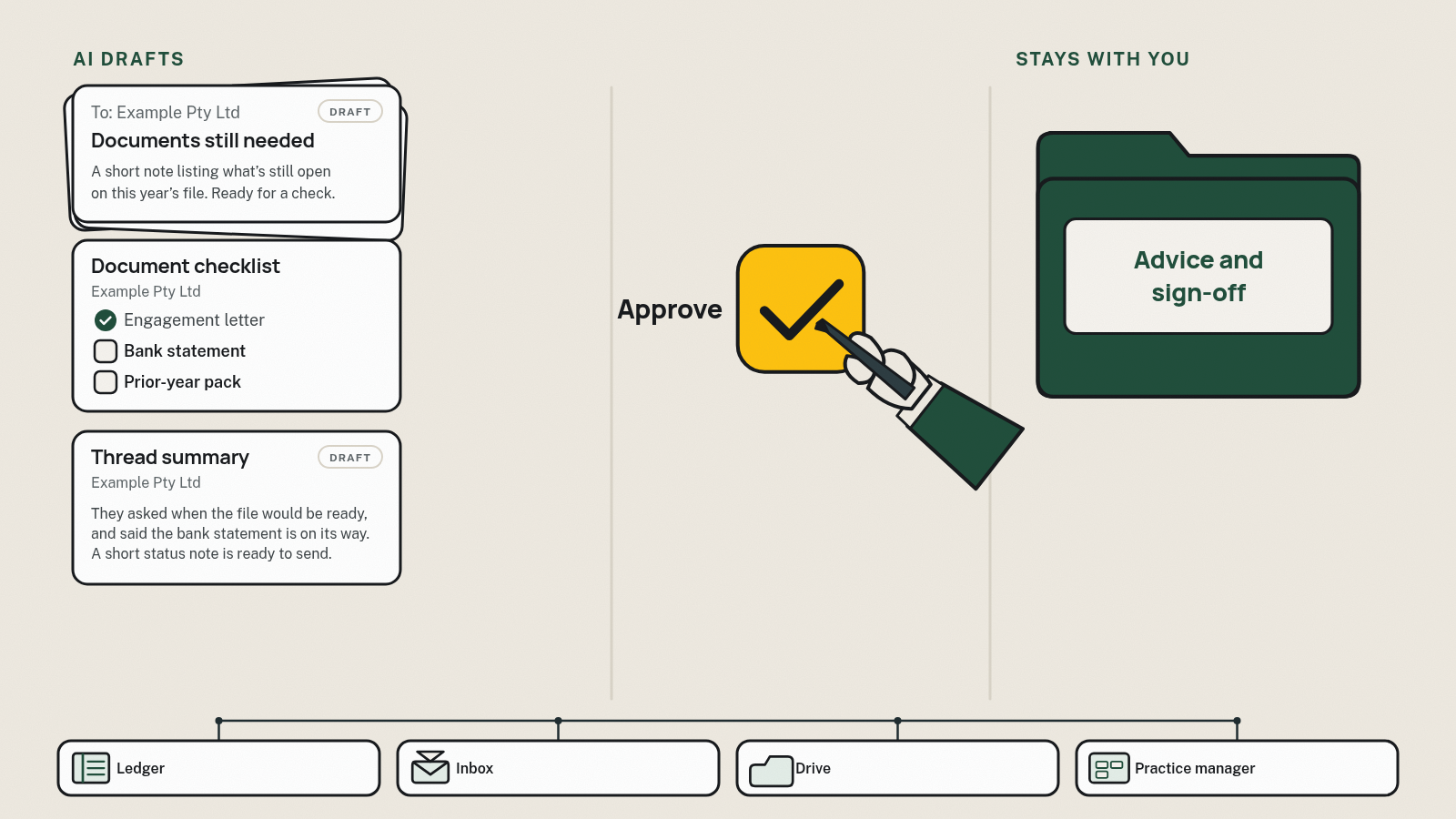
Drafting emails faster helps. The bigger shift is AI that reads across those systems, where they allow it, and does three things:
- It finds the answer. "Where's this file up to?" is answered from your own records, not from memory.
- It passes it to the right person. A client's reply reaches whoever owns the job, not whoever happened to open the inbox.
- It lines up the next step. A chase, a status update or a handover note is drafted and waiting for a person to approve.
None of that replaces your systems. Xero stays the ledger and the practice manager stays the job list. What changes is how information moves between them, and how much of the stitching people do by hand. It's only as good as the records underneath: if a job status is out of date, so is the answer.
Where Does AI Help, Task by Task?
Here's how it plays out across the admin of a typical practice. The pattern is the same every time: AI drafts or organises, a person checks, and the professional work stays with the accountant.
| Practice task | What AI can draft or organise | What a person checks | What stays with the accountant |
|---|---|---|---|
| Tax-time and EOFY document chasing | A per-client list of what's still missing; reminder emails only for the outstanding items | The list is right for this client; tone, timing; nothing is asked for twice | What the client actually needs to provide, and why |
| BAS prep and admin | A list of what's due and outstanding this cycle; requests for missing statements or receipts; suggested coding, where your software offers it | Every suggested code and match; the request is going to the right person | The BAS itself: the figures, the treatment and the sign-off |
| New client onboarding | The engagement letter and checklist from your agreed template; a welcome email; a list of what's still to come | Scope, fees and names are right; nothing has been edited out of the template | Whether to take the client on, the scope and the fee |
| Email triage and thread summaries | A short summary of a long thread: what was asked, what was sent, and what's still open | Nothing important was dropped; the summary matches the attachments | Any answer that's really advice |
| "Where's my return up to?" | A status update drafted from your own job records | The status is current and true; there are no promised dates nobody agreed to | Any conversation about timing pressure, fees or a problem with the file |
| Meeting and call notes | A summary of notes or a transcript, with action items and who owns each one | Action items and owners; anything sensitive the client said | The recommendation and the file note on why |
| Internal handoffs | A handover note when work moves between staff or someone goes on leave | It's complete, and the next person has actually picked it up | Review and sign-off |
| Answering staff questions | Answers from the firm's own records, where those records are connected, such as "what did we send this client last year?" | The answer points to a real record | Anything beyond "what does our file say" |
| Tax positions, advice and lodgement | Nothing beyond tidying the wording of a letter you've already written | — | Always: the judgement, the advice, the sign-off and the lodgement |

Tax-time and EOFY document chasing
You send the list, wait, follow up, get half of it, and follow up again. AI is good at the dull part: one list per client, and a reminder that names only what's still missing. A person checks the list and approves the reminder. What a client should provide, and why, is your call. We're covering this one in detail in tax document chasing.
BAS prep and admin
Each BAS cycle brings the same admin: who's due, and which statements or receipts are still missing. AI can draft that list and the requests. Your accounting software may also suggest matches or coding. Treat every suggestion as a suggestion. The figures, the treatment and the sign-off are the accountant's work.
New client onboarding
Engagement letters and checklists usually get retyped from last year's template. AI can fill your agreed template with the new client's details and draft the welcome email. A person checks the scope, the fee and the names before anything is sent. There's more on this in accounting onboarding.
Email triage and thread summaries
A three-week client thread with four people and six attachments takes time to reread. A summary of what was asked, what was sent and what's still open turns that into a minute's read. The person replying still opens the attachments, and if the reply is really advice, the accountant writes it.
"Where's my return up to?"
If your job records are kept up to date, AI can draft the answer from them: "We've got everything except your rental statement." A person checks it's current and promises no date nobody agreed to.
Meeting and call notes
Many meeting tools now produce a transcript and summary. The useful bit in a practice is turning those notes into tasks with owners. A person checks the actions, and the reasoning behind any recommendation stays in your own file note.
Handoffs and the knowledge in people's heads
Every firm has things "only Sam knows": which client sends everything on 30 October, and whose statements go to their partner's email. When that lives in one person's head, work stalls when they're on leave. AI can draft handover notes and answer staff questions from the firm's own records, but only if those records exist and are written down somewhere it can read.
What Stays With You?
This is the honest part.
- The advice. Tax positions, structuring, what a client should do. AI can tidy the wording of advice you've written. It doesn't give it.
- The judgement calls. Whether a number looks right, and when to push back. That's what clients pay for.
- Review, sign-off and lodgement. Your name, your responsibility. Nothing an AI tool drafts replaces the review.
- The relationship. The hard conversation about a bill, a late return or bad news. business.gov.au calls AI "no substitute for building a real human connection with customers". In a practice, that conversation is the service.
- Fixing a messy process. If jobs live in three spreadsheets and one person's memory, AI just makes the mess faster. business.gov.au notes custom AI solutions "need to be trained on high-quality, well organised data".
- Your staff. AI takes the typing and chasing off your team so they get time back for clients and skilled work. business.gov.au tells owners to "explain that you're not introducing AI to replace employees". We give the same answer about our own work.
What Could Go Wrong?
Three things go wrong most often, and each has a plain fix.
1. A confident wrong answer nobody checked
AI writes fluently even when it's wrong: a missing item listed as received, a date nobody agreed to, a summary that drops the one sentence that mattered. business.gov.au is blunt: "Your business is responsible for everything your AI tools do."
Fix: a named person approves anything that goes to a client or touches money, and you have a clear way to switch the tool off if it misbehaves.
2. Client files in the wrong place
Use tools that keep client files in your own systems, check the settings, and keep a person in the loop. Don't paste client details into a personal or public chatbot account. If you're testing a prompt, use placeholders like {client name}. business.gov.au suggests making sure "you understand what data the tool uses and how that data is stored", so ask the vendor.
For anything beyond that, such as your firm's specific obligations, talk to your own adviser.
3. Tool sprawl and cost creep
One tool summarises email, another chases documents, another takes meeting notes. Each has its own fee, and none of them talk to each other.
Fix: before adding anything, list every AI subscription the firm pays for, its monthly cost in AUD, whether that's GST-inclusive, and whether it's billed per user or per firm. Then check what's already built in.
Do You Need to Replace Xero to Use AI?
No. Keep your software and connect it. Xero and your practice manager (Xero Practice Manager, Karbon, FYI or something else) stay the source of truth. There's no migration, nothing gets replaced, and nobody has to relearn a new ledger.
Start with the AI that's already built in. business.gov.au's advice is to start by "looking at what you already have", and a lot of it now sits inside the tools practices use every day. Some examples, from each vendor's own pages (checked 12 Nov 2026; features and plans change, so check your own):
| Tool (example) | What the vendor says its AI does |
|---|---|
| Xero | Xero's AI, JAX, "works inside your Xero account", capturing bills and receipts and reconciling bank transactions (Xero). It "automatically reconciles transactions when it's highly confident they match", and otherwise suggests a match and leaves it for you (Xero). It also helps "with admin tasks like creating invoices or quotes" (Xero). Checked 12 Nov 2026. |
| Karbon | Lists email summaries of long threads, help composing and refining emails, client summaries, and drafting client emails from tasks (Karbon). |
| FYI | Its AI (in beta, on the Elite plan, as checked 12 Nov 2026; features and plans change) helps "analyse documents, summarise information, draft emails, identify task actions" inside automations. It also says practices "are responsible for reviewing and validating all AI-generated content before use" (FYI). |
Turn on what you already pay for and test it. Xero AI is built for the work inside Xero: the ledger, the bank feed, invoices and quotes. What's usually left is the work that moves across tools. That's the client's reply in the inbox, the document in the drive and the job status in the practice manager. Each tool's AI sees its own part of the story, and someone still carries the rest between them.
That's the layer Runtime builds. It joins up the tools you keep, where they allow it, so information moves between them without being retyped.
Where Should a Practice Start?
Small. business.gov.au suggests you "start by trialling AI in 1 or 2 areas of your business". Here's a practice version:
- Pick one task. The admin that eats the most senior time, often document chasing or status questions.
- Pick a quiet window. Not the peak of tax time or a BAS deadline.
- Use a tool you already pay for. Check your practice and accounting software first.
- Write the rules down. What it drafts, who approves it, and what it never does (for example, it never answers a tax question).
- Test it on internal or dummy files first. Use placeholders, not live client details.
- Run it on real work. Note what you had to fix.
- Keep it or drop it. If staff spent longer fixing drafts than writing them, it's the wrong tool for that task.
What Can You Copy and Use Today?
Swap the bits in {curly brackets}. Only use the prompts in a tool your firm has checked, and use placeholders rather than client details while you test.
1. Client document request (email)
Subject: {client name}: what we still need for your {year} {return / BAS}

Hi {first name},

Thanks for the documents so far. To finish your {return / BAS}, we're still waiting on:

- {item 1}
- {item 2}
- {item 3}

You can upload them here: {upload link}. Or reply to this email with them attached.

If any of these don't apply to you this year, just reply and let us know, and we'll update our list.

We'd love to have these by {date} so we can get your {return / BAS} done on time. If anything's unclear, call me on {phone}.

Thanks,
{your name}
{firm} · {phone}The list comes from your file, not from the AI. Keep it to what's still missing, so clients aren't asked for something twice.
2. Summarise a client email thread (prompt)
Summarise this email thread for a colleague who has to reply. Use only what's in the thread and attachments listed. Give me:
1. What the client asked for, in their words where possible
2. What we've already sent or promised, with dates
3. What's still open, and who owns each item
4. Any deadlines mentioned
Don't give tax advice or suggest an answer to any tax question. If something is unclear or contradictory, list it as a question at the end instead of guessing.
Thread: {thread with client details replaced by placeholders}3. "Where's it up to?" status update (email)
Hi {first name},

Quick update on your {return / BAS}: {status, e.g. "we've got everything we need and it's with {reviewer} for review" / "we're waiting on {item}"}.

{Next step, e.g. "Once that's in, we'll be in touch to go through it with you."}

Thanks,
{your name}
{firm}Only send a date if someone in the firm has agreed to it.
4. Meeting notes to tasks (prompt)
Turn these meeting notes into a task list. For each task give: the action, who owns it (from the notes only), and any date that was agreed. Don't add tasks that aren't in the notes. Don't summarise or restate any advice given; write "advice discussed, see file note" instead. List anything unclear as a question at the end.
Notes: {notes with client details replaced by placeholders}What Should You Check Before Adding an AI Tool?
- Name the one task it's for, and roughly how much of the week it takes (your own estimate).
- Check what you already pay for. Your practice or accounting software may already do it. Switch that on first.
- Ask where client data goes. Where is it stored, is it used to train anything, and can you switch that off?
- Keep client details out of personal and public chatbot accounts. Use placeholders when testing.
- Decide who approves what goes out, and how you'll switch the tool off if it goes wrong.
- Write down what it never does, starting with "it never answers a tax question".
- Check it connects to the tools you already use, or someone will be retyping.
- Add up the cost: AUD per month, GST in or out, per user or per firm, and the total across every AI subscription.
- Trial it away from peak season, on dummy files first.
- Anything about your firm's specific obligations goes to your own adviser.
Where Does Runtime Fit?
If the AI in your practice software does the job, use it. You don't need us.
We don't replace Xero or your practice software. We build around them, connecting them where they allow it, so information moves between them without someone retyping it.
We're worth talking to when you're an established firm and admin is eating hours every week across onboarding, document chasing, status questions and handoffs, and the pieces live in different tools.
For accounting and advisory firms, that's work like this. Client onboarding: "An engagement letter and checklist drafted from your agreed template." Document chasing: "Missing items listed, with reminder emails drafted and waiting for a person." And "Deadlines and renewals on one list." It all sits in one hub, connected to the tools you already use (for example Xero), where they allow it. You can ask "where's this file up to?" on a dashboard, or in Slack or WhatsApp, and get the answer from your own records. And the rule that matters: "Nothing goes to a client, and nothing moves money, until you or your team approve it." We don't give tax advice and we don't lodge. That stays with you.
How a build can work (illustrative example, fictional names, not a client result): Example Pty Ltd's client emails the bank statement that was holding up their return. It's recognised as the outstanding item on the job's checklist, filed to the client's folder, and the job moves to "ready to prepare" in the practice manager. A note to the preparer and a thank-you to the client are queued for a person to approve. Nobody had to search the inbox or retype anything.
Every build is different. It starts with the Phase 1 Systems Audit and Blueprint: we map how work moves through the firm, confirm which of your systems can connect and how, and give you a blueprint and a fixed-price quote. It's a fixed price, quoted upfront, and you keep the blueprint either way. If you go ahead, it's a four-to-eight-week build, and you own what we build.
FAQ
Will AI replace accountants?
Not on the evidence of today's tools. They draft, summarise and sort. They don't exercise professional judgement, give advice or sign off a return. What changes is the admin around the work: less chasing, fewer status interruptions, and more time for review and clients.
Will AI replace bookkeepers?
The same logic applies. Software increasingly suggests matches and coding, but someone still checks them, chases the gaps and spots what looks wrong. The data entry shrinks; the checking and client work matter more.
What's the best AI for accountants in Australia?
There isn't one best tool. Start with the AI features in the practice and accounting software you already pay for, because they already hold your clients and jobs. business.gov.au gives the same advice. Then look at the gaps between tools (see Do You Need to Replace Xero to Use AI?). Add up any new tool's monthly cost in AUD first.
Can I use ChatGPT or Copilot as an accountant?
For drafting and tidying admin writing, yes: emails, checklists, summaries and meeting actions. Use the version your firm has checked and set up, not a personal account, and use placeholders instead of client details. Don't use it to answer tax questions or give advice, and check everything it writes before it goes anywhere.
Can AI do my clients' BAS?
No. AI can help with the admin around a BAS: listing what's due, drafting requests for missing statements, and suggesting matches or coding where your software offers it. The figures, the treatment and the sign-off stay with the accountant or bookkeeper responsible.
Do I have to tell clients I'm using AI?
That depends on your obligations, so check with your own adviser. Practically, it's a good habit to tell clients when they're dealing with an automated tool directly. business.gov.au notes customers "want to know when they are talking to an AI rather than a human".
This guide is general information about practice admin. It isn't legal, tax or compliance advice.
Which task eats your senior people's week? Does the software you already pay for do it? Who checks it before it goes to a client? Answer those three and you've got your AI plan.
Related posts
 Professional servicesTrades and field service
What Walks Out the Door: How to Capture Tribal Knowledge Before a Key Staff Member Leaves
Capture tribal knowledge before a key staff member leaves: map what only they know, file it where the work lives, then prove someone else can run it.
9 min read
 Professional services
Who Are We Waiting On? How to Track Client Deadlines Without a Complex Spreadsheet Beside Your Practice Software
Tracking what's due and who you're waiting on shouldn't need a spreadsheet beside your practice software. A plain-English guide for Australian accounting firms.
11 min read
 Trades and field service
What AI Can Actually Do for a Trade Business
Honest, plain-English guide to AI for Australian tradies: what it can do across quotes, bookings and invoices, what it can't, the risks, and a checklist.
14 min read